ContractorsClient job, two photos

The brief on the way in, the signed report on the way out.

Your client raises the job with the finding attached. Your engineer does the work with the photos and notes in hand. The report goes back signed, and the client keeps it on their asset.

Coming soon Request a demo

Who it is for

Inspection and maintenance companies working across client sites.

How it works for you

  • Jobs with the brief attached
  • Photos and notes on site
  • Reports the client accepts
  • Quotes and RFQs
  • Access scoped to the job
  • Your own sites too

—Client job, two photos

A client emails you a job with two photos. Your engineer needs the address, the finding and the history, and has none of them on site.

The client shares the asset with you. Your engineer opens the job on their phone, sees the finding and the photo, marks it done with their own photos, and the client verifies it.

What you getOne place to work from per client, with the proof of every job you did on their assets.

Fig. 01On a phone
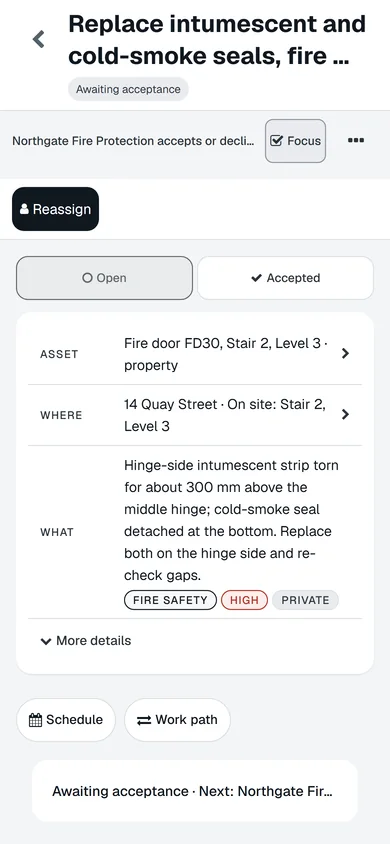
The same job on a phone.
A real screen of the released platform, with example data.

How it works for you

  1. Jobs with the brief attached

    The failed inspection item, the photo and the location arrive with the job. No re-typing.

  2. Photos and notes on site

    Photos, notes and a signature at completion, offline if the site has no signal.

  3. Reports the client accepts

    The report compiles from the work itself, with a reference number, and the client signs it off.

  4. Quotes and RFQs

    Receive a request for quote, respond, and turn the accepted quote into the job.

  5. Access scoped to the job

    You see the assets in scope and nothing else on the client site.

  6. Your own sites too

    Run your own equipment and vehicles on the same record, with the same checks.

What you would use it for

  1. Sun · 08:12Distribution board DB-03, Level 3

    Manage maintenance and repairs

    Jobs from faults, failed inspections and schedules, in one list. Your team, a contractor or quotes. Tracked through to completion.

  2. Sun · 07:12Passenger lift 1

    Report a fault and get it fixed

    Anyone can report a fault by scanning the label. You approve it, it becomes a job with the photo attached, and the fix lands on the record.

  3. MonFire door FD30, Stair 2, Level 3

    Share with contractors, tenants and colleagues

    Colleagues, contractors and anyone with the label can be on the record. None of them cost extra.

  4. Mon · 08:12Fire door FD30, Stair 2, Level 3

    Inspect assets and produce reports

    Any asset, from a checklist, on a phone, offline if it has to be. The report is built from what was recorded and goes out for signature.

Put one of your assets on it today

Your first asset is free, with no card. Label it, check it, sign the report. Then decide.

Coming soon Request a demo

Your first asset is free, with no card.Web, iPhone and Android · from £3 per asset after that

Coming soon