Keep a register of every asset.

Every property, machine and vehicle on its own record, with a label, its certificates and its links to other assets. Import your list, print the labels, hand it to the team that looks after it.

Start free Request a demo

Is this for you?

  • You have a list of assets in a spreadsheet that nobody keeps up to date.
  • Certificates and manuals live in folders, email and drawers.
  • A new building, depot or fleet is about to become yours.

The problem

A new warehouse with 60 assets arrives with a spreadsheet and a folder of certificates. Nobody knows which certificates have expired.

What the app does about it

Import the spreadsheet; each row becomes an asset with its own page. Print the labels and stick them on. Attach each certificate to its asset; the expiry date is tracked. Hand the site to the team that looks after it.

What you get

One up-to-date list of everything you look after, with its documents, and a label on each asset that opens its page.

See it

A real recording of the released app, with example data.

How the app walks you through it

These are the steps the app itself shows. Tap Guide me on any screen and it points at the next one.

  1. Name your site

    A name and a category are enough to start. Address, structure and the managing team can come later.

  2. Add an asset here

    Each asset gets its own record on the site: name, type, level, criticality. Import from a spreadsheet if you have one.

  3. Print its label

    Print the QR label. From now on the label opens exactly this record: history, documents, open work.

  4. What kind of document?

    Certificates, manuals and drawings attach to the asset they belong to, with an expiry that is tracked.

  5. Move it to a team

    Give the site or the asset to the team that looks after it. Their people see it. Nobody costs extra.

The parts this uses

Asset register

Every asset on its own record, with what depends on what.

Every property, machine and vehicle you look after has its own record, its own label, and its links to the assets it depends on. When one fails, you can see what else is affected.
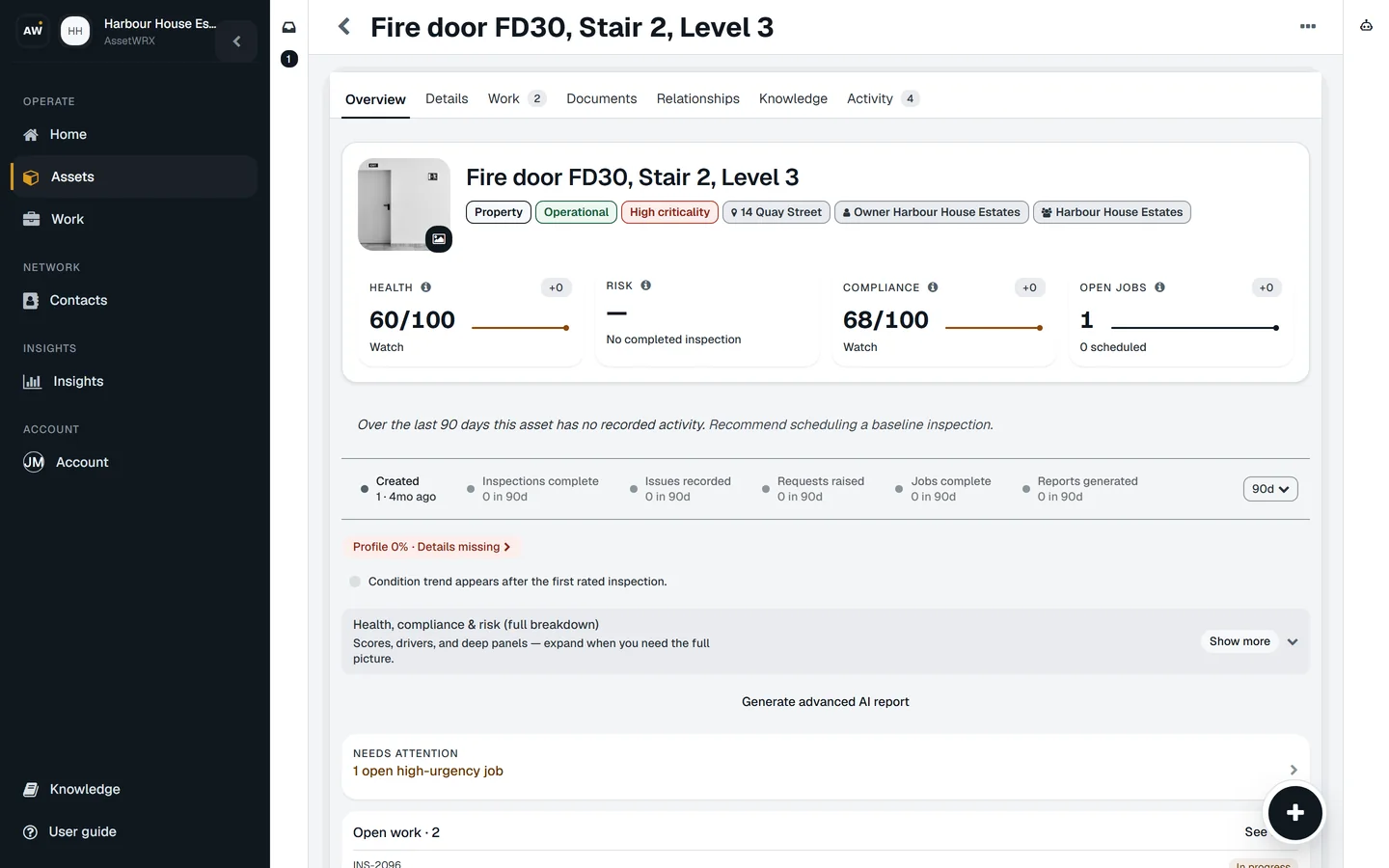
Asset record for Fire door FD30, Stair 2, Level 3: health, risk and compliance tiles, open work and history.
  • A label on each asset opens its record

    Print the QR label from the app and stick it on. Scanning it opens that asset: its history, documents and open work. To report a fault, no account is needed.

  • Record what depends on what

    The boiler is in the plant room, the plant room serves floors three to six, the hoist rides on the van. Pick an asset and see how far a failure there reaches.

  • Sites, and the people who look after them

    Assets belong to a site; a site belongs to a team. Give a site to a team and everything in it follows, with a map alongside the list.

  • Bring in the list you already have

    Import a spreadsheet; each row becomes an asset. The app suggests which column is which and points out likely duplicates before they are created.

  • See what is missing on each record

    Each asset shows how complete its record is and what filling in a field unlocks, so the weak records are visible before someone asks about them.
Documents and certificates

Certificates that tell you before they expire

Every certificate lives on the asset it belongs to. The expiry date is worked out for you when you upload it, and the renewal is in your Work list before it is due.

  • Upload it once, on the asset

    Camera, photo library or a file. PDFs, Word documents and photos. The certificate goes on the boiler, the lift or the van it belongs to, not in a folder.

  • The expiry is worked out for you

    Each kind of certificate knows how long it is valid. A lifting examination dated today is already flagged for six months, an electrical certificate for five years. AI reads the dates off the document; you confirm.

  • The renewal is a job before it is a problem

    Expiring and expired certificates show in your Work list with the next step ready: renew, start the check, raise the job.

  • Someone confirms it is the real thing

    A photo of a certificate is not the same as an accepted one. Documents can be validated or rejected, so you know which records would stand up.

  • The history stays

    Renewing replaces the current certificate and keeps every previous one. When someone asks for last year's, it is on the record with this year's.

Knowledge base

The answer on the asset, not on someone's drive

Manuals, how-tos, notes and links kept on the asset they describe, and searchable across everything you look after.

  • Five kinds of knowledge, not just PDFs

    Files, how-tos, questions and answers, notes and links. The tip only the outgoing engineer knows fits as well as the manual does.

  • One scan away

    Scan the label and the how-to is on the screen, next to the asset's documents and history. Pin the one that matters most to the top.

  • One search across every asset

    Search finds every note, how-to and file on every asset you can see, whichever site it is on.

  • Say it, and let the app tidy it

    Dictate a note standing at the machine, and let AI turn it into something the next person can read.

  • The right people see the right things

    A tenant, a contractor and an engineer do not all need the same notes. Each item can be limited to who should see it, or shared by link with someone who has no account.

Do this on one of your assets today.

Your first asset is free, with no card. Label it, check it, sign the report. Then decide.

Start free Request a demo