ManufacturingForklift, pre-shift check

Preventive checks and faults at the machine, on one record

Label the equipment. Operators report at the machine; technicians run the planned checks; the examinations and certificates stay on the asset.

Coming soon Request a demo

Who it is for

Plant, lines and the equipment that keeps them running.

How it works for you

  • Report at the machine
  • Preventive maintenance that creates its own work
  • Lifting equipment examinations on record
  • Pass, Flag, Fail
  • Offline on the shop floor
  • Reports for the inspector and the insurer

—Forklift, pre-shift check

The forklift fails its pre-shift check on Tuesday. The driver tells the supervisor, who is on leave. It runs for three more days.

A Fail on the check raises the job with the photo attached and sits in the Work list until someone takes it. The line manager sees it the same morning.

What you getDaily checks on every machine, thorough examinations on the hoists with their due dates, and the record the insurer asks for.

Fig. 01On a phone
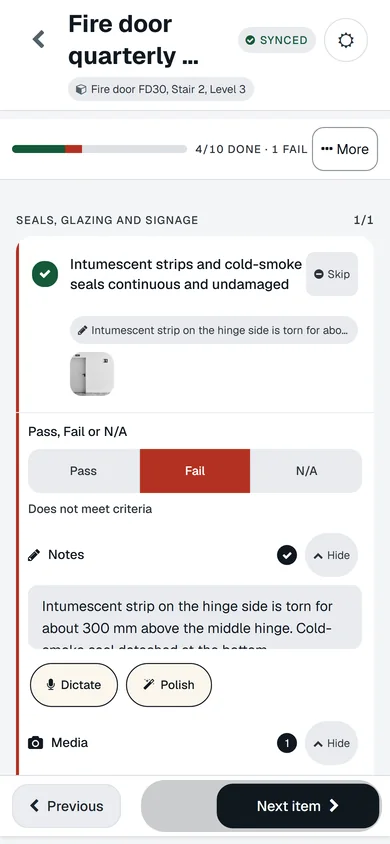
A fire door check on a phone: synced, 4 of 10 done, the seals item failed with a note and a photo, Pass Fail N/A controls, Dictate and Polish.
A real screen of the released platform, with example data.

How it works for you

  1. Report at the machine

    A QR label on the guard opens the fault form. The report carries a photo and lands on the right asset.

  2. Preventive maintenance that creates its own work

    Set the cycle per asset. Inspections and jobs appear when due and escalate when they are not done.

  3. Lifting equipment examinations on record

    Thorough examination reports sit on the hoist or crane with their due date, and the next one is a job before it is overdue.

  4. Pass, Flag, Fail

    Three states, so a check that needs attention is not a failure, and a failure raises the job with the finding attached.

  5. Offline on the shop floor

    Do the check where the signal is not, and sync when you are back at the office.

  6. Reports for the inspector and the insurer

    Signed, timestamped, with the photos and notes inside. Shareable with access you control.

What you would use it for

  1. MonFire door FD30, Stair 2, Level 3

    Schedule inspections and maintenance

    Set it once and it repeats. The next inspection or job is created on its own and shows up before it is due.

  2. Mon · 08:12Fire door FD30, Stair 2, Level 3

    Inspect assets and produce reports

    Any asset, from a checklist, on a phone, offline if it has to be. The report is built from what was recorded and goes out for signature.

  3. Sun · 08:12Distribution board DB-03, Level 3

    Manage maintenance and repairs

    Jobs from faults, failed inspections and schedules, in one list. Your team, a contractor or quotes. Tracked through to completion.

  4. Mon · 07:12Harbour House, 14 Quay Street

    See what needs attention

    Every check and job adds up. See what is at risk, what is overdue, where work is stuck.

Put one of your assets on it today

Your first asset is free, with no card. Label it, check it, sign the report. Then decide.

Coming soon Request a demo

Your first asset is free, with no card.Web, iPhone and Android · from £3 per asset after that

Coming soon