
FleetVan 3, wing mirror

Walk-around checks that turn defects into work

Each vehicle or piece of plant is an asset with its own checks, documents and history. The driver reports on the phone; the defect becomes a job with the photo attached.

Coming soon Request a demo

Who it is for

Vehicles, plant and mobile equipment.

How it works for you

  • Daily checks on a phone
  • Defects become jobs
  • Documents that expire
  • Read the VIN from a photo
  • History per vehicle
  • Pay per vehicle, not per driver

—Van 3, wing mirror

A driver finds a cracked wing mirror on the walk-around and texts the office. By the next shift the van is out again.

They scan the label on the van and report it with a photo. It is a job for the garage before the van leaves the yard, and the fix lands on the van’s record.

What you getEvery walk-around, defect, MOT and service on each vehicle’s record, for the DVSA and for the next driver.

Fig. 01In a browser
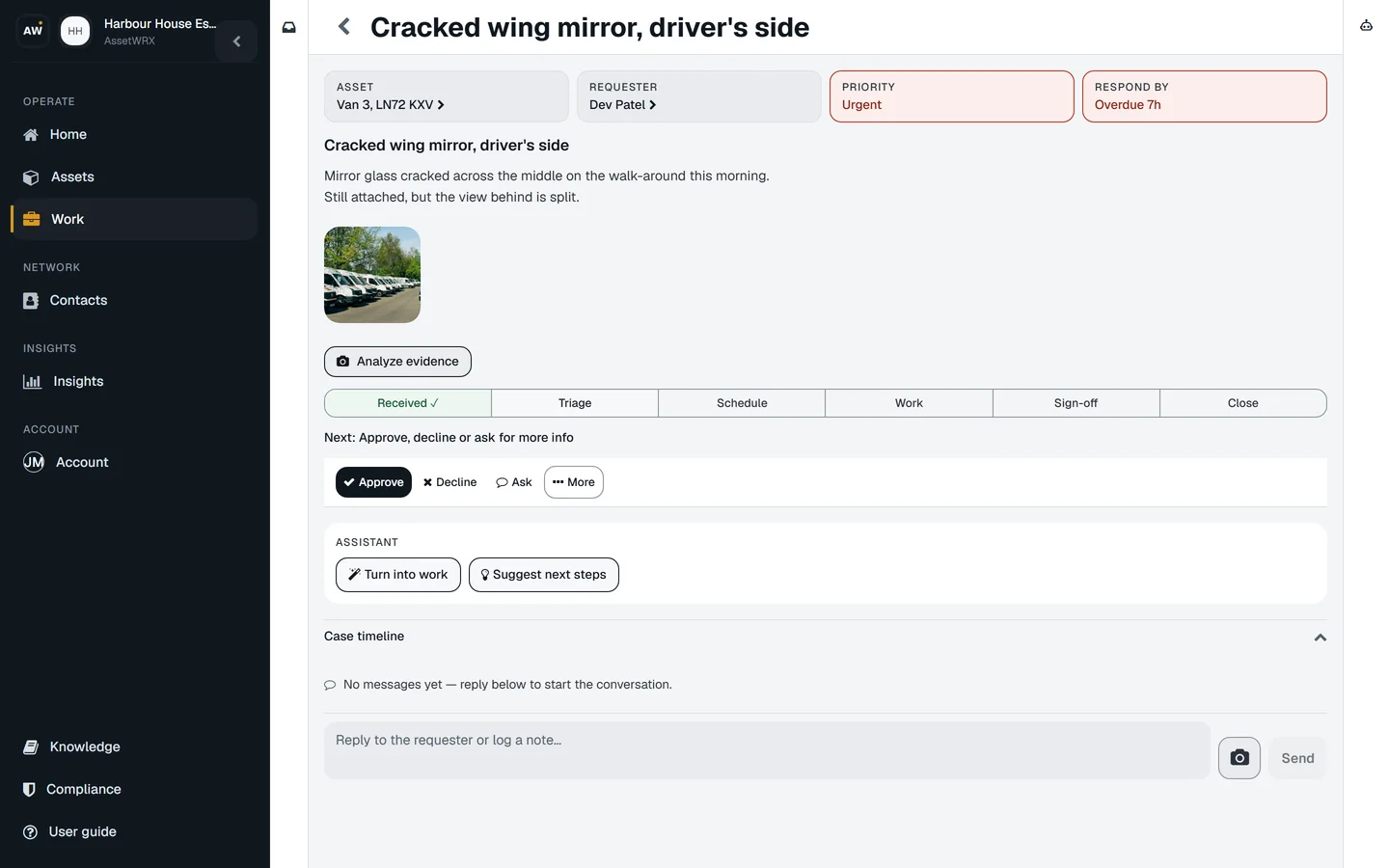
Request detail: the cracked wing mirror reported on Van 3 by its driver by scanning the label, with the photo, the Received, Triage, Schedule, Work, Sign-off, Close path and the Create work button.
A real screen of the released platform, with example data.

How it works for you

  1. Daily checks on a phone

    A walk-around template with photos and notes, done offline in the yard and synced later.

  2. Defects become jobs

    A failed item raises the job with the finding attached, assigned to the workshop or a contractor.

  3. Documents that expire

    Test certificates, insurance and inspection reports sit on the vehicle with their dates.

  4. Read the VIN from a photo

    Photograph the number plate and let AssetWRX read the serial into the record.

  5. History per vehicle

    Every check, defect and job in one timeline, for the inspector and for the resale.

  6. Pay per vehicle, not per driver

    Every driver can run the check. You pay for the vehicles.

What you would use it for

  1. Mon · 08:12Fire door FD30, Stair 2, Level 3

    Inspect assets and produce reports

    Any asset, from a checklist, on a phone, offline if it has to be. The report is built from what was recorded and goes out for signature.

  2. Sun · 08:12Distribution board DB-03, Level 3

    Manage maintenance and repairs

    Jobs from faults, failed inspections and schedules, in one list. Your team, a contractor or quotes. Tracked through to completion.

  3. MonFire door FD30, Stair 2, Level 3

    Schedule inspections and maintenance

    Set it once and it repeats. The next inspection or job is created on its own and shows up before it is due.

  4. Sun · 07:12Passenger lift 1

    Report a fault and get it fixed

    Anyone can report a fault by scanning the label. You approve it, it becomes a job with the photo attached, and the fix lands on the record.

Put one of your assets on it today

Your first asset is free, with no card. Label it, check it, sign the report. Then decide.

Coming soon Request a demo

Your first asset is free, with no card.Web, iPhone and Android · from £3 per asset after that

Coming soon