Inspect assets and produce reports.

Pick the checklist and inspect the asset on a phone, with or without signal. The report is built from what you recorded and goes to the responsible person to sign.

Start free Request a demo

Is this for you?

  • You do checks that someone else will later ask to see.
  • Some of the checks happen where there is no signal.
  • The report is typed up afterwards, from memory and photos.

The problem

The quarterly fire door check in a school: forty doors, half of them in a basement with no signal. The results go on a paper sheet, then into a spreadsheet, then into a report a week later.

What the app does about it

Open the check before you go down. Pass, Fail or N/A on each door, a photo and a note where it matters. It syncs when you are back upstairs. The report is built from those answers and photos and goes to the head to sign on their phone.

What you get

A signed report for every check, built from what was actually recorded, on the record of each asset checked.

See it

A real recording of the released app, with example data.

How the app walks you through it

These are the steps the app itself shows. Tap Guide me on any screen and it points at the next one.

  1. Pick what to inspect

    Choose the asset. The last checklist used for it is already selected; change it if you need to.

  2. Start the inspection

    Guided, by section or as a list. Pass, Fail or N/A, a note, a photo. In the basement with no signal, then synced when you are back.

  3. Sign it off

    The report compiles itself from the answers and the photos and notes, so the certificate and the findings cannot disagree.

  4. Choose who gets it

    Send the report to the client or the responsible person with the role they need: view, approve, or sign.

  5. Send it

    They sign on their phone. The signature and the date stay on the asset's record.

The parts this uses

Inspections

Do the check where the thing is. The report is built from what you recorded.

Pass, Fail or N/A on each item, a photo and a note where it matters, with or without signal. A failed item becomes a job. The report is built from your answers and goes to the responsible person to sign.
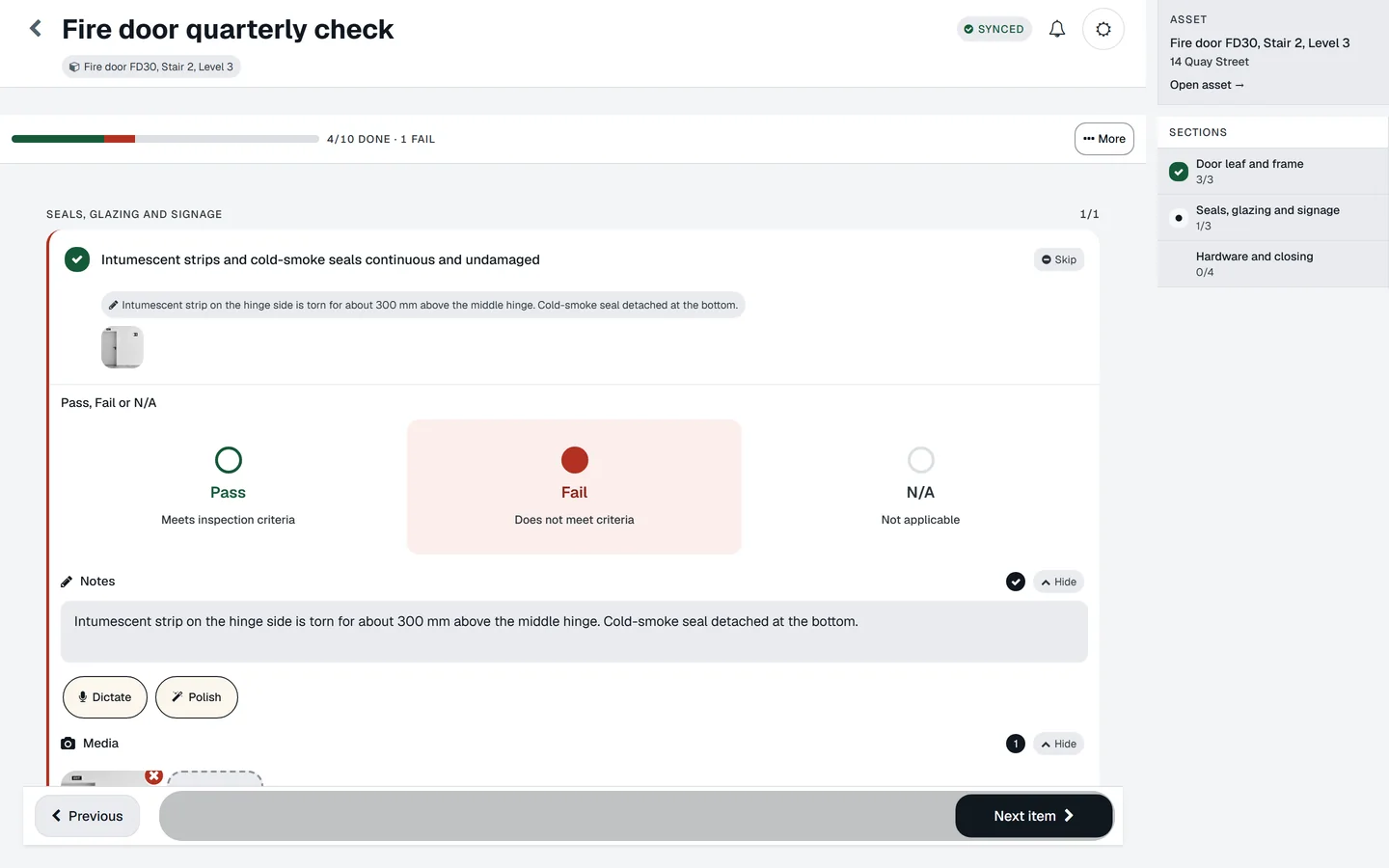
A fire door check in the desktop web app with the sections rail.
  • It works with no signal

    Open the check before you go into the basement. Answers and photos are saved on the phone and sent when you are back in range. The check shows what has not reached the server yet.

  • The photo is on the item that failed

    Not in the camera roll. Draw on it to mark the defect. Dictate the note if typing is slow.

  • A failed item raises the job

    The finding, the photo and the asset go with it, assigned and dated. Nobody retypes anything.

  • The report is built from the answers

    The findings and the report cannot disagree, because they are the same data. A named person signs it on their phone.

  • Start from a checklist that exists

    Fire doors, legionella, forklifts, vehicles, emergency lighting and more, in full on this site. Or describe the check and let the app draft one.
Reports and sharing

Built from the check, signed by a person, read without an account.

The report is built from the check itself, approved by a named person, and sent to whoever needs it, without them needing an account.

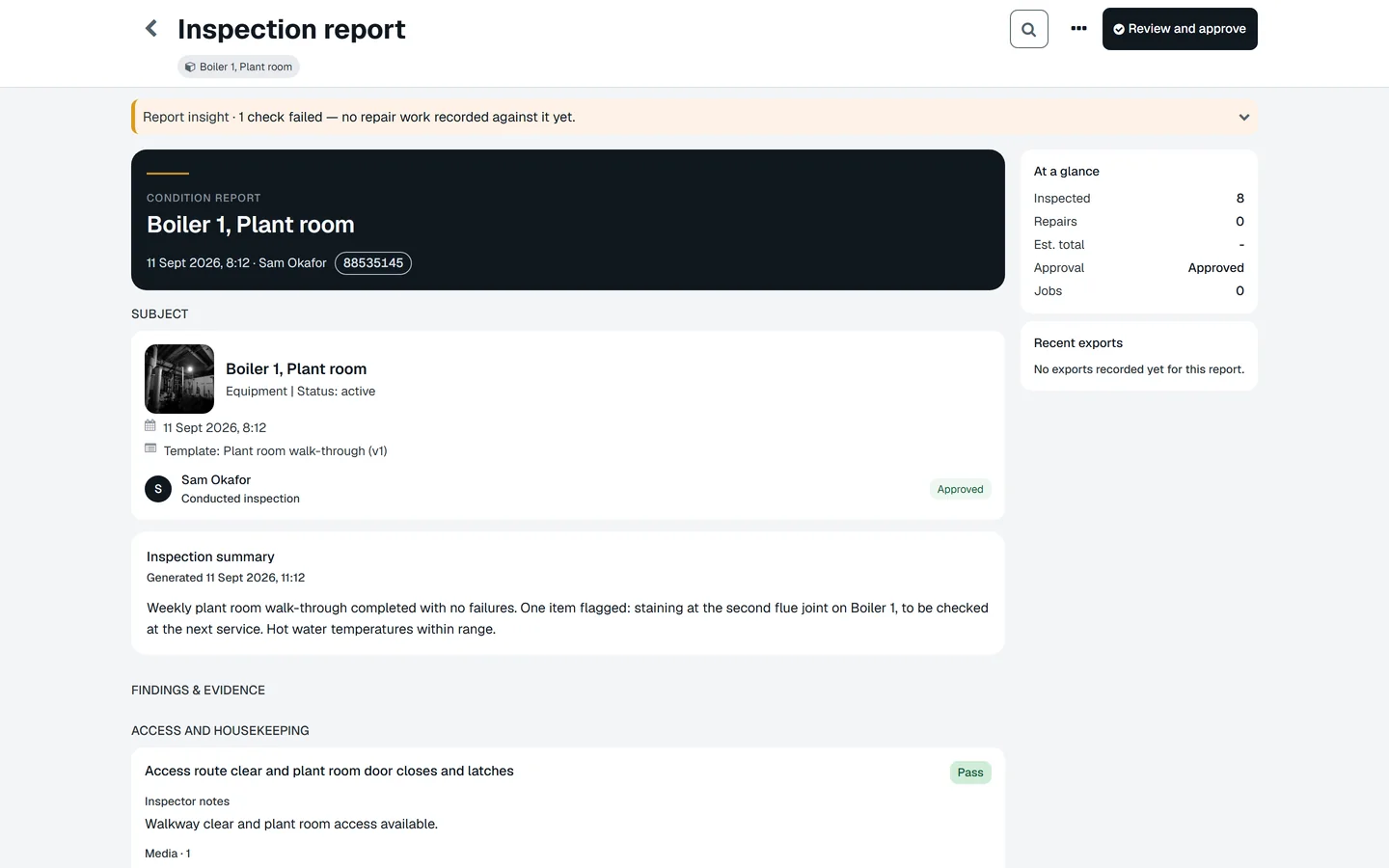
An approved inspection report for Boiler 1, Plant room: ink cover with the report reference, at-a-glance counts, the summary and findings with evidence.
  • Built from the check, not typed afterwards

    Every answer, photo and note is already in it. The findings and the report cannot disagree.

  • A named person signs it

    Signature and typed name, approve or send back. Before they sign, the app points out findings with no photo, high risk, or a repeated recommendation. The person decides, not the software.

  • Real PDF, Word and Excel, with your logo

    Proper files with the photos inside, carrying the branding they were issued under, so an old report still looks the way it did.

  • Share it with exactly the right access

    A link per person, with what they may see: the report, the jobs, the checks, the documents. The landlord, the client or the inspector reads it without an account.

  • Whoever reported the fault can follow it

    The person who scanned the label gets a tracker showing where their report is and how it ended.

Do this on one of your assets today.

Your first asset is free, with no card. Label it, check it, sign the report. Then decide.

Start free Request a demo