Report a fault and get it fixed.

Anyone can report a fault by scanning the label on the asset. You approve it, it becomes a job, and the fix is recorded where the next check will find it.

Start free Request a demo

Is this for you?

  • Faults reach you by phone, text, email or in passing, and some get lost.
  • You decide what gets done, but someone else does the work.
  • You want to know it was fixed without chasing.

The problem

A driver finds a cracked mirror on the van at the start of the shift and texts the office. By the next shift the text is buried and the van is out with the crack.

What the app does about it

The driver scans the label on the van and reports it with a photo, with no account. It lands in your Work list. You approve it and it becomes a job for the garage, with the photo. When the garage marks it done, the completion goes on the van's record.

What you get

Every fault in one list with its photo and its asset, and a record of who fixed it and when.

See it

A real recording of the released app, with example data.

How the app walks you through it

These are the steps the app itself shows. Tap Guide me on any screen and it points at the next one.

  1. What should happen?

    The requester scans the label and says what they want: a bit of help, a job, or an inspection. No account needed.

  2. Approve it first

    The report lands in your Work list with the photo and the asset. Approve, decline, or ask for more.

  3. Turn it into work

    Create the job from the request. Title, description, asset and priority come across; you choose team, one contractor or quotes.

  4. Assign the work

    Hand it to a colleague or a contractor with a date. They get the brief, the finding and the address, and nothing else.

  5. Sign it off

    Completion, the photos and notes, and the check that it was done land on the asset's record, dated. The next inspection will find them there.

The parts this uses

Requests

Report a fault by scanning the label. Approve it, and it is a job.

Anyone can report a fault by scanning the label on the asset, with a photo and no account. It lands in your Work list. You approve it, it becomes a job, and the person who reported it can follow what happens.
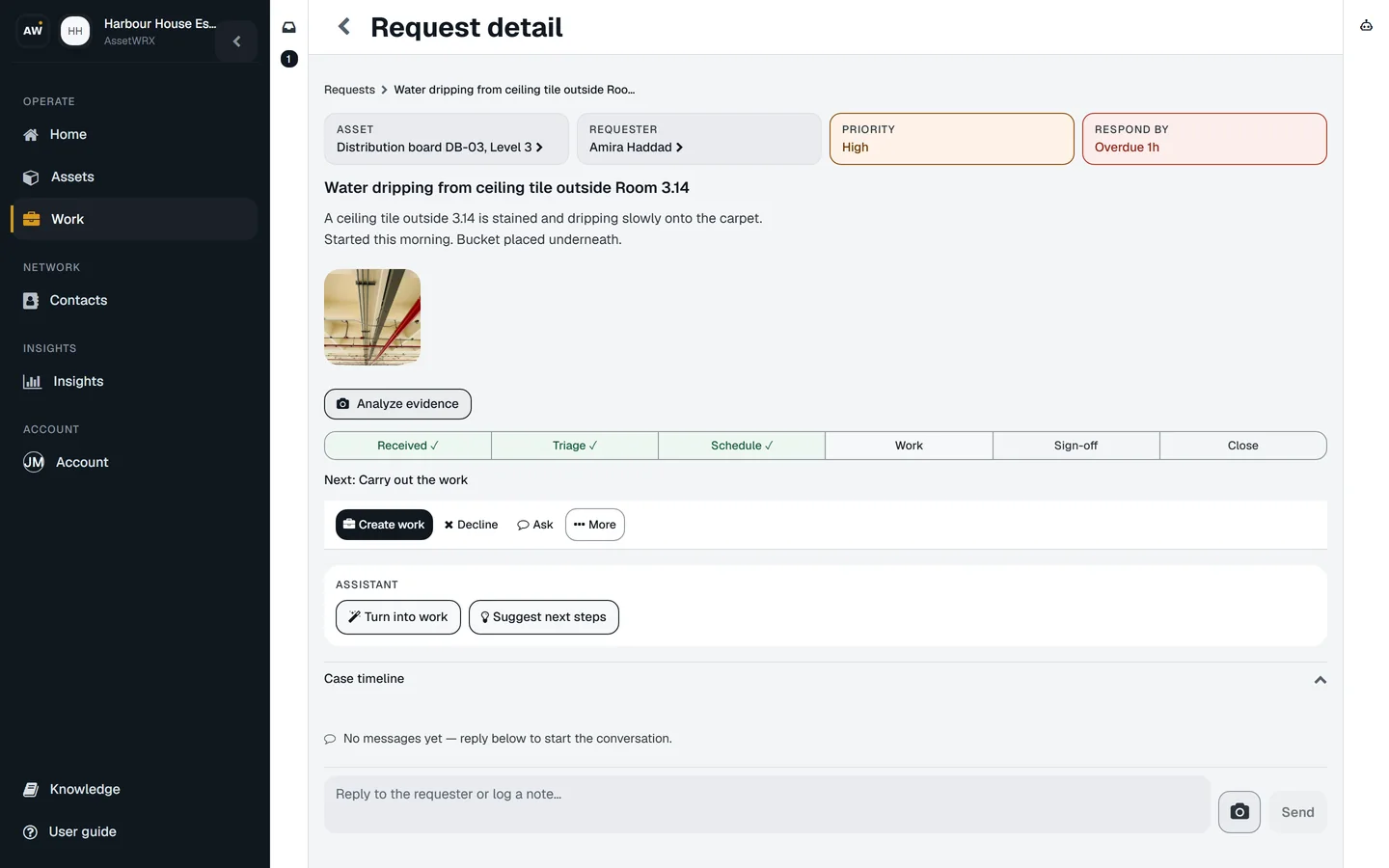
Request detail: a water leak reported by the front desk with a photo, the Received, Triage, Schedule, Work, Sign-off, Close path and a Create work action.
  • Anyone can report, without an account

    Scan the label, describe the problem, add a photo. The report lands on that asset. Nobody has to learn your system or be given a login.

  • You decide, with the asset beside you

    The report, the photo, the asset and its history on one screen. Approve it, decline it with a reason, or ask the reporter for more.

  • Approving it creates the job

    Title, description, photo, asset and priority carry across. You choose who does it: your team, a contractor, or quotes from several. Nothing is retyped.

  • The reporter can follow it

    Whoever reported it can see where it is and what happened, still without an account, and only what they are allowed to see.

  • The fix lands on the record

    When the job is done, the completion and its photos go on the asset's record, dated, where the next check will find them.
Do this on one of your assets today.

Your first asset is free, with no card. Label it, check it, sign the report. Then decide.

Start free Request a demo