MonEvery site

Prove what you must prove.

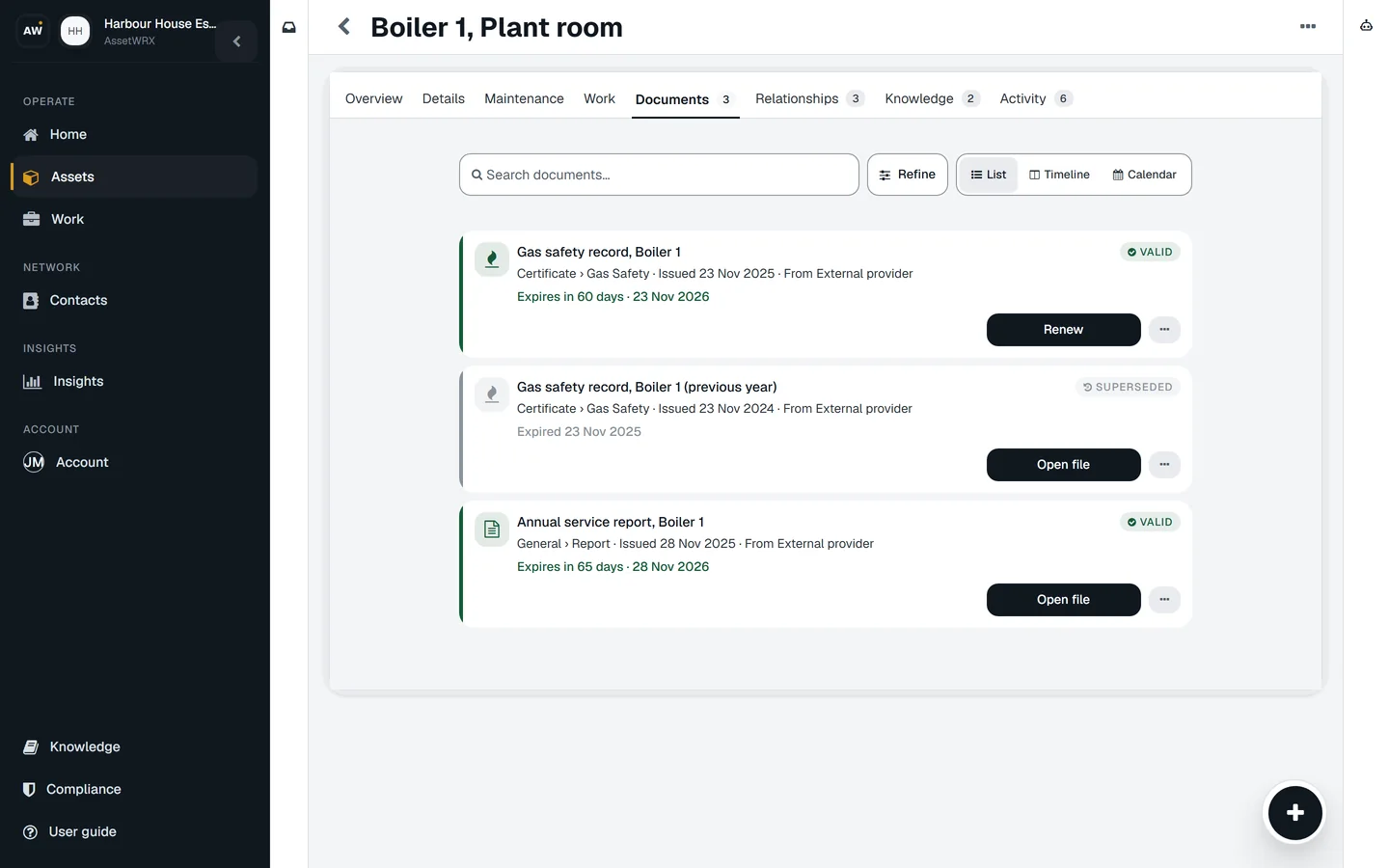
Every certificate and renewal across every site sits in one list, sorted by what runs out first.

Coming soon Request a demo

Is this for you?

  • Someone can ask you to show a check was done.
  • Your certificates sit in folders, inboxes and filing cabinets.
  • You find out something has run out when the renewal is already late.

—Every site

The insurer asks what you can prove. The lift examination is in one inbox and the gas record in another. Nobody knows which forklift is covered.

One list holds every certificate and renewal, across every site. It is sorted by what runs out first, and you renew or inspect from the row.

What you getA straight answer in a minute, and the renewal raised before it is late.

Fig. 01In a browser
The compliance register across every site: compliant 5, expiring 4, overdue 1, missing evidence 22, unknown 11, then the rows — a lift examination overdue by eight days, a forklift expiring in five, a gas safety record in fifteen — each with Renew and Inspect.
A real screen of the released platform, with example data.

How AssetWRX walks you through it

These are the steps AssetWRX itself shows. Tap Guide me on any screen and it points at the next one.

  1. Put the certificate on the asset

    Upload it against the thing it covers, with its issue date and the date it runs out.

  2. Watch one list

    Valid, expiring, overdue, and what has no record at all. Every site, one list.

  3. Renew from the row

    Raise the renewal or book the inspection without leaving the list.

  4. Show it

    Open the asset and the certificate is there, beside the checks and jobs around it.

The parts this uses

Documents and certificates

Certificates that tell you before they expire

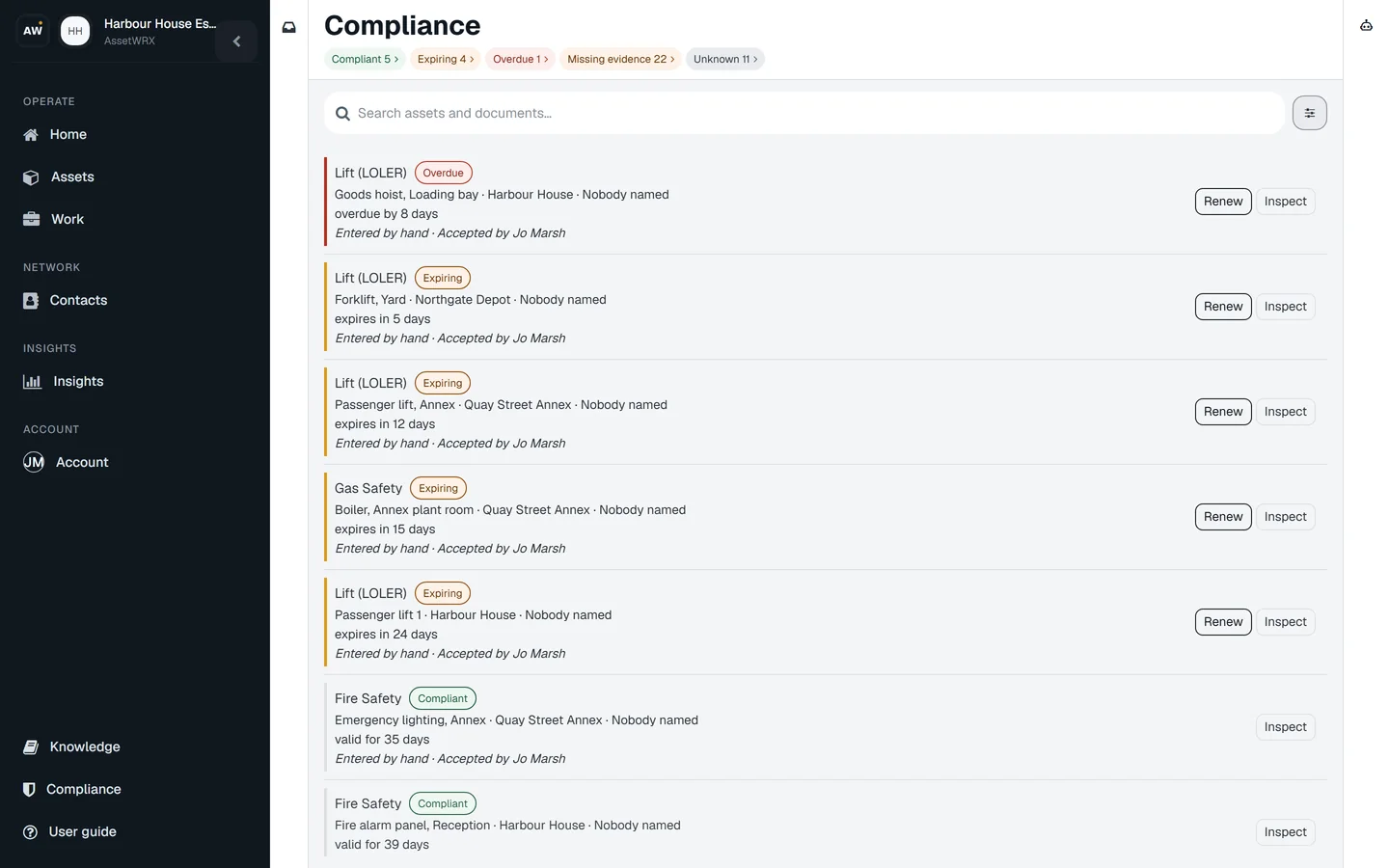
Every certificate lives on the asset it belongs to. The expiry date is worked out for you when you upload it, and the renewal is in your Work list before it is due.

Fig. 02In a browser

The Documents tab on Boiler 1: this year's gas safety record, valid, expiring in 60 days with a Renew button; last year's, superseded; and the annual service report.
Certificates that tell you before they expire
  • Upload it once, on the asset

    Camera, photo library or a file. PDFs, Word documents and photos. The certificate goes on the boiler, the lift or the van it belongs to, not in a folder.

  • The expiry is worked out for you

    Each kind of certificate knows how long it is valid. A lifting examination dated today is already flagged for six months, an electrical certificate for five years. AI reads the dates off the document; you confirm.

  • The renewal is a job before it is a problem

    Expiring and expired certificates show in your Work list with the next step ready: renew, start the check, raise the job.

  • Someone confirms it is the real thing

    A photo of a certificate is not the same as an accepted one. Documents can be validated or rejected, so you know which records would stand up.

  • The history stays

    Renewing replaces the current certificate and keeps every previous one. When someone asks for last year's, it is on the record with this year's.

Do this on one of your assets today.

Your first asset is free, with no card. Label it, check it, sign the report. Then decide.

Coming soon Request a demo

Your first asset is free, with no card.Web, iPhone and Android · from £3 per asset after that

Coming soon