Manage maintenance and repairs.

Every job in one Work list, whether it came from a reported fault, a failed inspection or a schedule. Give it to your team, a named contractor or out for quotes, and track it to done, with the cost on the record.

Start free Request a demo

Is this for you?

  • Jobs come from several places and live in several lists.
  • Some work goes to your own people, some to contractors, some out to quote.
  • You want to know what is done, what is late and what it cost.

The problem

The boiler service, the dripping tap on the third floor and the forklift brakes are three jobs in three places: an email, a text and a sticky note.

What the app does about it

All three are jobs in one Work list, each with its asset, its photo and its due date. The service goes to the contractor, the tap to your caretaker, the brakes out for quotes. When each is done, the completion and the cost land on the asset’s record.

What you get

One list of every job: who has it, when it is due, what it cost, and the proof it was done, on the record of the asset it was for.

See it

A real recording of the released app, with example data.

How the app walks you through it

These are the steps the app itself shows. Tap Guide me on any screen and it points at the next one.

  1. Raise the job

    From a reported fault, a failed inspection item, a schedule, or by hand. The asset, the description, the photo and the priority come with it.

  2. Choose who does it

    Your own team, a named contractor, or quotes from several contractors compared side by side.

  3. Send the brief

    The contractor gets the job, the finding, the photo and the address, and a place to work from. Nothing else on your site.

  4. Track it

    Open, in progress, waiting for a part, waiting for review. The Work list sorts by what needs you today.

  5. Close it with the proof

    Completion notes, photos and the cost, dated, on the asset’s record. The next inspection will find them there.

The parts this uses

Work and jobs

One Work list. Your team, a contractor, or quotes.

Reported faults, checks and jobs are one list, sorted by what needs you today. Each job goes one of three ways: your team, a named contractor, or quotes from several.
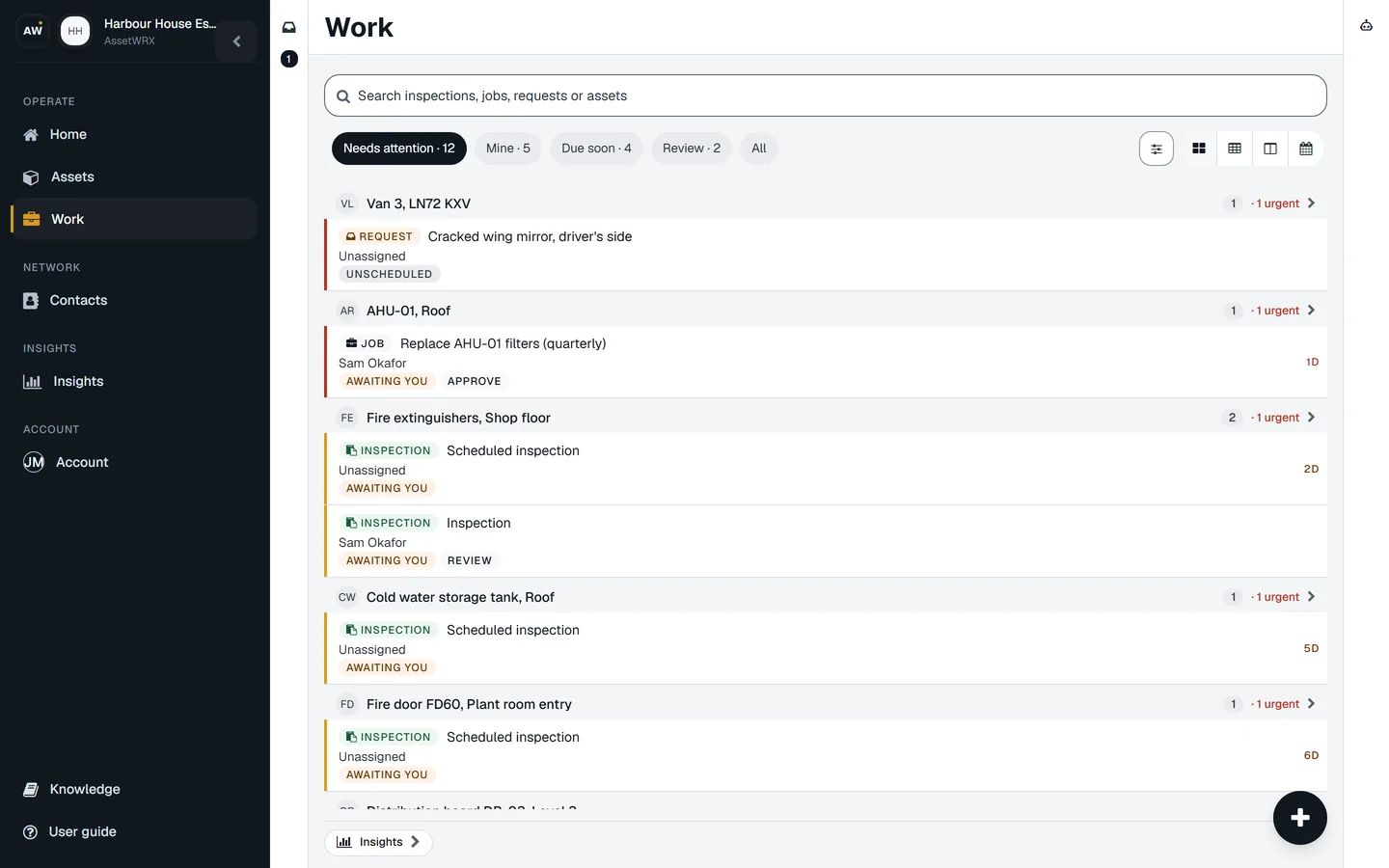
The Work list, Needs attention: the cracked wing mirror reported on Van 3, unscheduled; the AHU filter job awaiting your approval; the extinguisher check awaiting review; then the checks due in two, five and six days, grouped by asset.
  • One list, sorted by what needs you

    Needs attention, mine, due soon, waiting for review. The number on the Work tab is the list you open, so the number you see is the work you have.

  • Each job goes one of three ways

    Your own team, a named contractor, or quotes from several contractors compared side by side. You choose once; the app does the rest of the handover.

  • Nothing starts blank

    A job made from a reported fault or a failed check arrives with the asset, the photo, the finding and the priority already filled in.

  • Jobs that repeat, repeat on their own

    Daily to yearly. The next one is created and assigned before it is due, with a reminder and a calendar invite the person can accept from their email.

  • The right person for the job

    Jobs can name the skills they need, and the app suggests who has them.
Do this on one of your assets today.

Your first asset is free, with no card. Label it, check it, sign the report. Then decide.

Start free Request a demo