Facilities managementPlant rooms, three sites

Planned checks and reactive work on the same record

Plant rooms, AHUs, panels and doors, each with its own history. Requests from the floor become jobs; scheduled checks run themselves; the report writes itself.

Coming soon Request a demo

Who it is for

In-house FM teams and outsourced providers.

How it works for you

  • One list for everything due
  • Offline in the plant room
  • Relationships that show blast radius
  • Contractors, quotes and RFQs
  • Reports your client accepts
  • See what is overdue, and why

—Plant rooms, three sites

Three sites, one team, and the weekly plant room walk-throughs slip whenever someone is on leave.

Each walk-through is a schedule on its asset. The next one is created on its own, shows on the Home page before it is due, and is reassigned in one tap.

What you getChecks done on time, per site, and the report the client asks for built from what was recorded.

Fig. 01On a phone
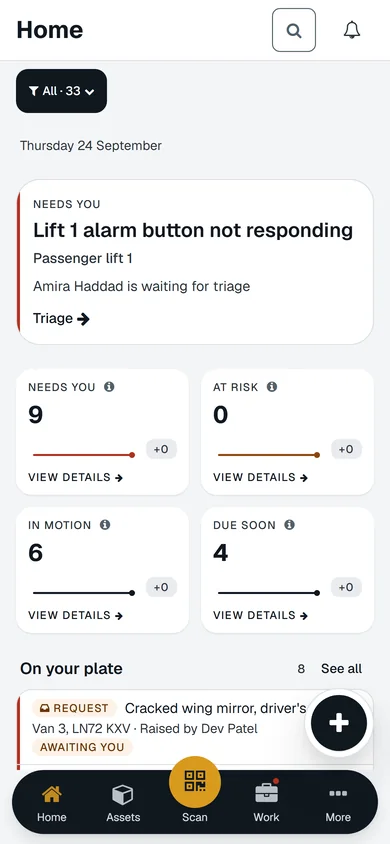
AssetWRX home on a phone: the request that needs you, four KPI tiles, the plate, and the bar with Home, Assets, Scan, Work and More.
A real screen of the released platform, with example data.

How it works for you

  1. One list for everything due

    Requests, inspections and jobs are one list with a type filter, not three modules to reconcile.

  2. Offline in the plant room

    Prepare the records you need, do the check with no signal, and see exactly what is still to sync when you are back.

  3. Relationships that show blast radius

    Mark what depends on what. When a chiller fails you can see which floors lose cooling.

  4. Contractors, quotes and RFQs

    Send a job to a contractor, compare quotes, and keep their photos and notes on your asset.

  5. Reports your client accepts

    Findings, photos, notes and approval compile into one report with a reference number, shareable with access control.

  6. See what is overdue, and why

    See overdue work, asset condition and where requests wait. Open the records behind a number.

What you would use it for

  1. Sun · 08:12Distribution board DB-03, Level 3

    Manage maintenance and repairs

    Jobs from faults, failed inspections and schedules, in one list. Your team, a contractor or quotes. Tracked through to completion.

  2. MonFire door FD30, Stair 2, Level 3

    Schedule inspections and maintenance

    Set it once and it repeats. The next inspection or job is created on its own and shows up before it is due.

  3. MonEvery site

    Prove what you must prove

    One list of what you can prove, across every site, sorted by what runs out first.

  4. Mon · 07:12Harbour House, 14 Quay Street

    See what needs attention

    Every check and job adds up. See what is at risk, what is overdue, where work is stuck.

  5. FriFinance system, SAP S/4HANA

    Connect the systems you already run

    A finance, ERP or CRM system connected by a wizard. Direction, conflict rule, secure access, test, activate.

Put one of your assets on it today

Your first asset is free, with no card. Label it, check it, sign the report. Then decide.

Coming soon Request a demo

Your first asset is free, with no card.Web, iPhone and Android · from £3 per asset after that

Coming soon